
Load Balancer System Design: A Walkthrough With Diagram
By Aniruddha · September 28, 2026 · 8 min read
Every system design answer that says "add more servers" needs a load balancer in front of them. It is one of the first boxes you draw, and interviewers like to dig into it: how does it choose a server, what happens when one dies, and what breaks when requests move between servers?
Below is a 50 second animation of the whole thing, drawn in CanvasKeep: three servers, two routing algorithms, a server failing its health check, and a user getting logged out. The rest of this post explains each step and the parts a short video skips.
1. Why one server is not enough
With one server, every request lands on the same box. You can scale it up with more CPU and memory, but that gets expensive fast, it has a hard ceiling, and it is a single point of failure: if it dies, everything is down.
Scaling out means running many smaller servers and putting a load balancer in front. Clients see one address; the load balancer spreads requests across the servers behind it. Need more capacity? Add a server.
2. The diagram
All traffic enters through the load balancer, which picks a server for each request. The servers keep no session state of their own; they read it from a shared store.
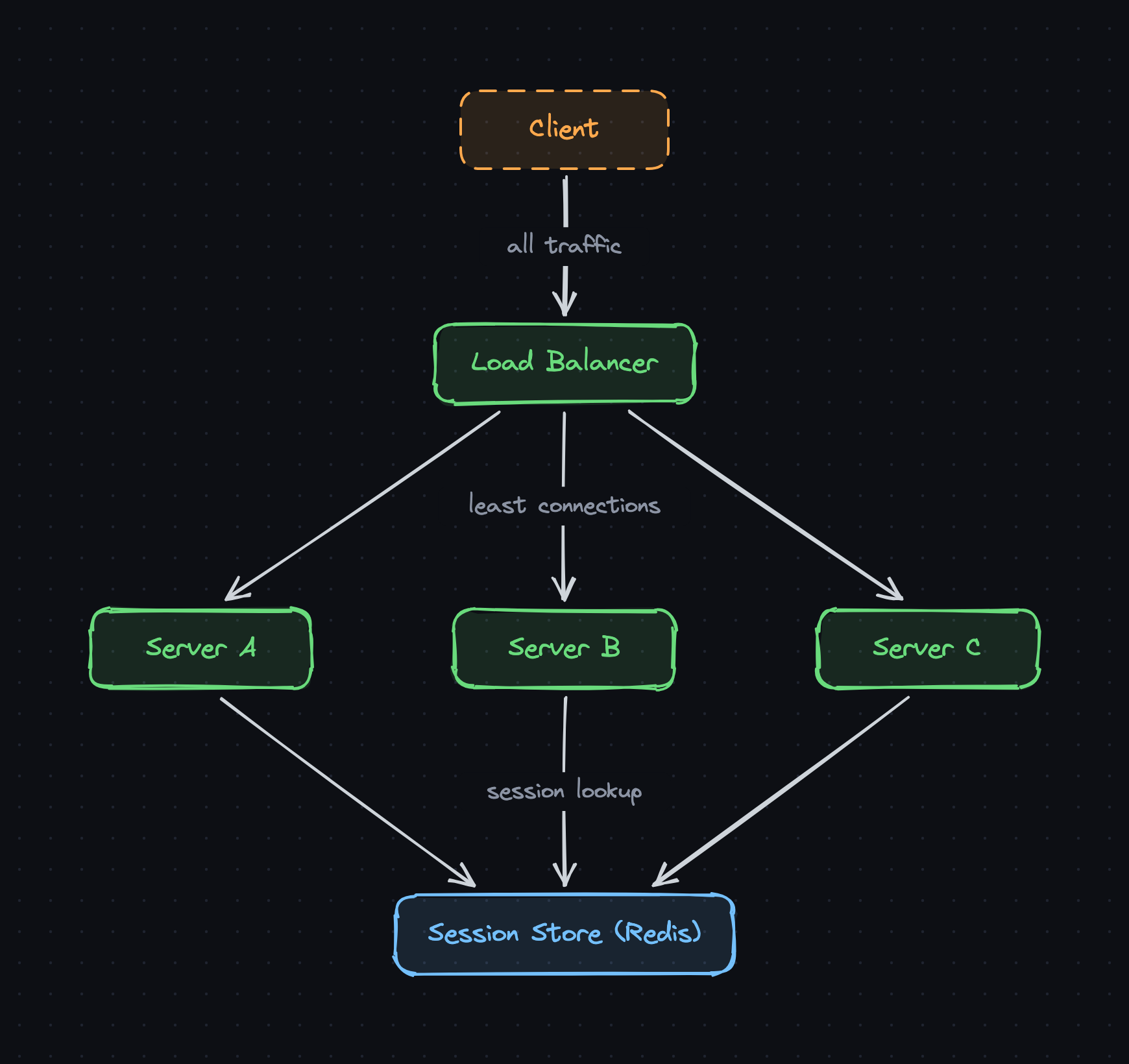
Get the editable diagram
An .excalidraw file. Open it on excalidraw.com, or in a CanvasKeep diagram with Open from the menu.
3. Layer 4 vs Layer 7
- Layer 4 (transport). Routes by IP and port and never looks inside the request. Very fast, works for any TCP or UDP protocol.
- Layer 7 (application). Reads the HTTP request, so it can send
/apito one pool and/imgto another, terminate TLS, add headers, and retry on another server. Most web apps use this.
Common choices: NGINX and HAProxy you run yourself, or managed ones like AWS ALB (Layer 7) and NLB (Layer 4).
4. Picking a server
Round robin
Servers take turns: A, B, C, A, B, C. Simple and even when requests are similar. But it is blind: a server stuck on slow requests still gets its turn.
Least connections
Send the request to the server with the fewest open connections. In the video, B is busy with three slow uploads, so new requests go to A and C. This handles uneven request times much better.
Others worth knowing
- Weighted round robin. Bigger servers get proportionally more turns.
- IP hash or consistent hashing. The same client or key always maps to the same server. Useful for caches, and it gives stickiness without cookies.
- Power of two choices. Pick two servers at random and use the less busy one. Close to least connections, with far less coordination.
5. Health checks
The load balancer pings each server every few seconds, for example GET /health. A server that fails a few checks in a row is taken out of rotation, and traffic flows to the rest. When it passes again, it comes back.
GET /health
Server A  200
Server B  200
Server C  timeout   -> out of rotation
These are active checks. Many load balancers also do passive checks: if real requests to a server start failing, it is marked down without waiting for the next ping. Before removing a server on purpose (a deploy, say), drain it: stop sending new requests and let in-flight ones finish.
6. The catch: sessions
A user logs in on server A, and A keeps the session in memory. The next request goes to B, which has never heard of them: 401, logged out. Two ways to fix it:
- Sticky sessions. The load balancer pins each user to one server, usually with a cookie. Easy, but load gets uneven, and if that server dies its users lose their sessions.
- A shared session store (what the diagram uses). Sessions live in Redis, and any server can read them. Servers become stateless, so any of them can handle any request and you can add or remove them freely.
Signed tokens such as JWTs are a third option: the session travels with each request, so there is nothing to store, at the cost of making logout and revocation harder.
7. What the 60 second version leaves out
- The load balancer as a single point of failure. Run an active and a standby pair with a floating IP, or use a managed service.
- TLS termination. Layer 7 load balancers usually decrypt HTTPS so the servers behind them do not have to.
- Global load balancing. Across regions, DNS-based routing or anycast sends users to the nearest healthy region before any regional load balancer sees them.
- Slow start. A server that just came back should get a little traffic at first, not its full share, while its caches warm up.
- Autoscaling. Pair the load balancer with an autoscaler that adds servers under load and registers them automatically.
Interview checklist
- Explain scale up vs scale out and the single point of failure.
- Choose Layer 4 or Layer 7 and say why.
- Pick an algorithm: round robin for similar requests, least connections for uneven ones.
- Add health checks and connection draining.
- Make servers stateless with a shared session store.
- Make the load balancer itself redundant.
Load balancers sit at the top of most designs, including the URL shortener and the rate limiter.
FAQ
What is the difference between a Layer 4 and a Layer 7 load balancer?
A Layer 4 load balancer routes by IP address and port without reading the request, which makes it fast and protocol-agnostic. A Layer 7 load balancer reads the HTTP request, so it can route by URL path, host or headers, terminate TLS, and retry failed requests, at some extra cost per request.
Round robin or least connections?
Round robin is fine when requests are short and similar, since every server gets an equal share. Least connections is better when request times vary a lot, like uploads or slow queries, because it sends new work to whichever server is least busy right now.
What are sticky sessions?
The load balancer sends all of a user's requests to the same server, usually by setting a cookie. It keeps in-memory sessions working, but load becomes uneven and users on a server that dies lose their session. Storing sessions in a shared store like Redis avoids both problems.
Isn't the load balancer a single point of failure?
It would be, so it is run in pairs or clusters. A common setup is an active and a standby load balancer sharing a floating IP that moves to the standby if the active one fails. Managed load balancers from cloud providers handle this for you.
Sources and further reading
- NGINX docs: Using nginx as HTTP load balancer, for round robin, least connections, IP hash for session persistence, and passive health checks.
- AWS: How Elastic Load Balancing works, for health checks, cross-zone balancing, and how Application (Layer 7) and Network (Layer 4) Load Balancers pick a target.
More system design in 60 seconds
- Rate Limiter System Design: A Walkthrough With Diagram
- Caching in System Design: A Walkthrough With Diagram
- URL Shortener System Design: A Walkthrough With Diagram
The diagram was drawn in CanvasKeep, which keeps Excalidraw diagrams in workspaces and folders with version history.