
Rate Limiter System Design: A Walkthrough With Diagram
By Aniruddha · September 28, 2026 · 8 min read
"Design a rate limiter" shows up in system design interviews because it looks like one counter and turns out to be a distributed systems problem. Where does the limit live? Which algorithm? How do several servers share one count without races?
I drew the design in CanvasKeep and turned it into a 50 second animation, below. The video shows the happy path and the one race condition that matters most. This post adds the parts it had to skip: the other algorithms, the exact Lua script, and what happens when Redis goes down.
1. Requirements
Functional
- Limit how many requests a client can make in a period, for example 10 per second per user.
- Support different rules per endpoint, user tier or API key.
- Reject requests over the limit with a clear response, and tell the client when to retry.
Non-functional
- Low latency. The check runs on every request, so it can only add a millisecond or two.
- Distributed. Many API servers share one limit per client, so the count cannot live in one server's memory.
- Fault tolerant. If the limiter breaks, the API should keep working.
2. Where the limiter lives
Not in the client. Client code can be modified and requests can be forged, so a client-side limit protects nothing. The limiter sits on the server side, in front of your application: as middleware in the API servers, or in an API gateway that every request passes through.
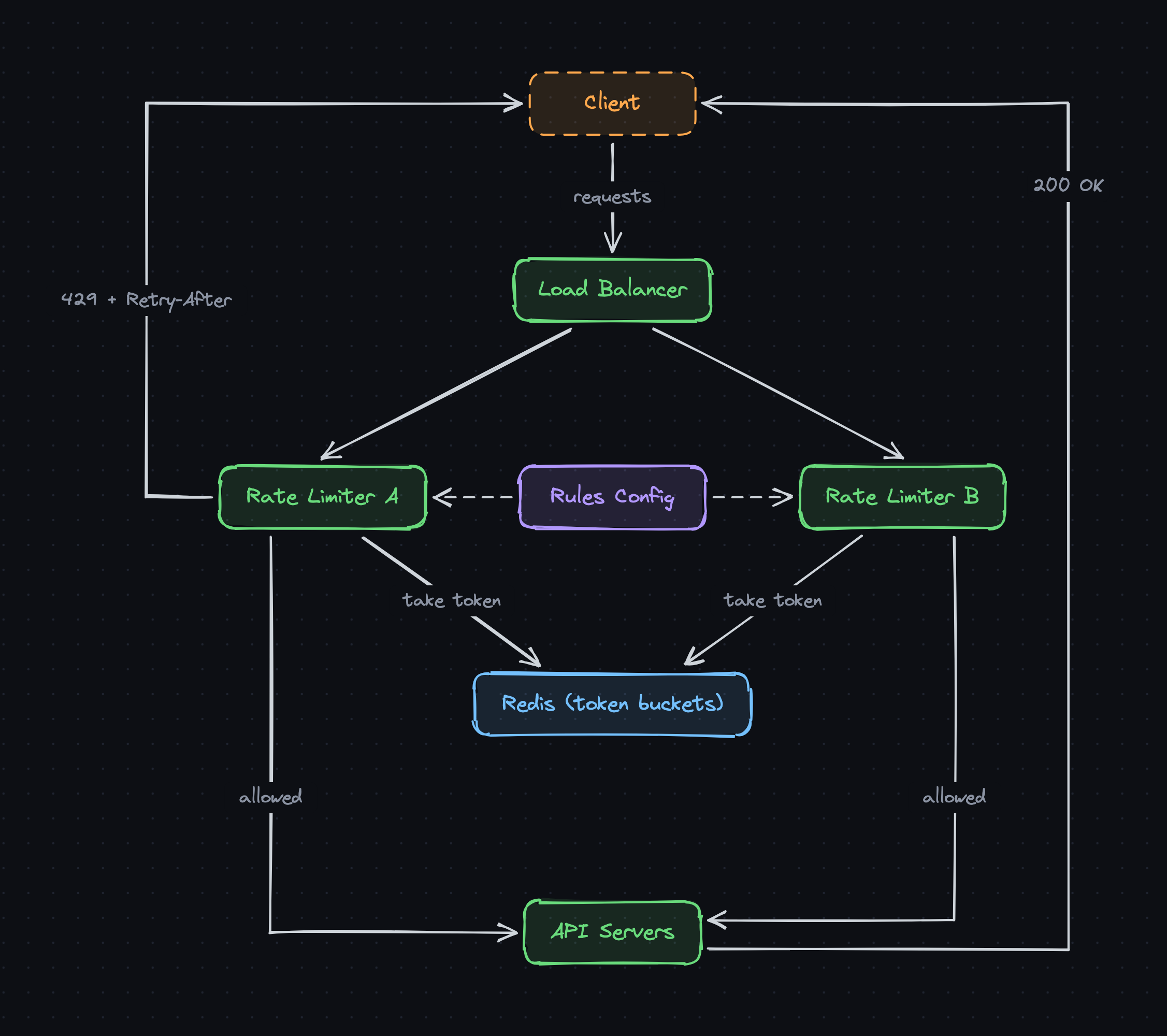
In the diagram, requests go through the load balancer to one of several rate limiter instances. Each instance caches the rules (who gets how many requests) from a config store, so the rules are not fetched on every request.
3. The full diagram
Requests come in at the top. Limiters A and B check a shared token bucket in Redis. Allowed requests continue to the API servers and get a 200. Rejected ones go straight back with a 429.
Get the editable diagram
An .excalidraw file. Open it on excalidraw.com, or in a CanvasKeep diagram with Open from the menu.
4. Choosing an algorithm
- Token bucket (what the diagram uses). A bucket holds up to
capacitytokens and refills at a fixed rate. Each request takes one token; an empty bucket means reject. It allows short bursts up to the capacity while holding the average rate. - Leaky bucket. Requests join a queue that drains at a fixed rate. Output is perfectly smooth, but bursts wait in the queue or get dropped.
- Fixed window counter. Count requests per calendar window, say per minute. Simple, but a client can send a full minute's worth at 0:59 and again at 1:00, doubling the rate at the boundary.
- Sliding window log. Store a timestamp per request and count the ones in the last minute. Exact, but memory grows with traffic.
- Sliding window counter. Blend the current and previous fixed windows, weighted by how far you are into the current one. Close to exact, with the memory cost of a fixed window.
5. The token bucket in detail
The video uses a bucket of 10 tokens refilling at 5 per second. A burst of 10 requests goes through, the 11th is rejected, and tokens drip back in at one every 200 ms.
Nothing actually refills the bucket on a timer. Each bucket stores two numbers, the token count and when it was last refilled, and the refill is worked out when the next request arrives:
elapsed = now - last_refill
tokens  = min(capacity, tokens + elapsed * refill_rate)
last_refill = now

if tokens >= 1:
    tokens -= 1        # allow
else:
    reject with 429
6. Shared state in Redis
With two or more limiter instances, a count kept in each one's memory lets a client get the full limit on every instance. So the buckets live in Redis, one hash per client key (user, IP or API key), and every instance reads and updates the same one:
HGETALL rl:user:42
tokens       7
last_refill  1790243130.4
This also means you do not need sticky sessions: any instance can handle any request. Set a TTL on each bucket so clients that stop sending traffic do not leave keys behind forever.
7. The race condition, and the Lua fix
If limiter A and limiter B both read a bucket with 1 token left at the same moment, both see 1, both allow the request, and both write 0. The client got two requests through on one token. Under real traffic this happens constantly.
The fix is to make the read, refill and take one atomic step. Redis runs a Lua script as a single operation, so no other command can land in the middle:
-- KEYS[1]: bucket key   ARGV: capacity, refill_rate, now
local b = redis.call("HMGET", KEYS[1], "tokens", "last_refill")
local cap, rate, now = tonumber(ARGV[1]), tonumber(ARGV[2]), tonumber(ARGV[3])
local tokens = tonumber(b[1]) or cap
local last = tonumber(b[2]) or now

tokens = math.min(cap, tokens + (now - last) * rate)
local allowed = tokens >= 1
if allowed then tokens = tokens - 1 end

redis.call("HSET", KEYS[1], "tokens", tokens, "last_refill", now)
redis.call("EXPIRE", KEYS[1], math.ceil(cap / rate) * 2)
return allowed and 1 or 0
One limiter gets 1 (allowed), the other gets 0 and returns a 429. If your servers' clocks might disagree, read the time inside the script with redis.call("TIME") instead of passing it in (Redis 5 or newer).
8. Allowed and rejected responses
An allowed request continues to the API servers. It helps to tell the client where it stands, using headers like these. They are a common convention, not a standard; an IETF draft defines RateLimit and RateLimit-Policy headers for the same job:
HTTP/1.1 200 OK
X-RateLimit-Limit: 10
X-RateLimit-Remaining: 6
A rejected request never reaches the API servers. The limiter answers immediately:
HTTP/1.1 429 Too Many Requests
Retry-After: 1
Instead of dropping it, some systems queue the request and process it later, which suits background jobs better than user-facing calls.
9. What the 60 second version leaves out
- Redis failure. Decide up front whether to fail open or closed. Stripe fails open, and so do many other APIs.
- Latency. A Redis round trip per request adds up. Keep Redis close to the limiters, and for very high traffic, let each instance take a small batch of tokens at once and spend them locally.
- Several limits at once. Real systems stack them: per user, per IP, per endpoint, and a global limit that protects the backend.
- Rule changes. Instances cache the rules, so push updates or reload them on a short interval.
- Multiple regions. A single Redis across regions is slow. Most systems limit per region and accept that a client can get slightly more than the global limit.
Interview checklist
- Clarify what is limited (user, IP, key) and the rules.
- Put the limiter server side: middleware or API gateway.
- Compare algorithms. Pick token bucket unless there is a reason not to.
- Share state in Redis, one bucket per client key, with a TTL.
- Make the check atomic with a Lua script.
- Return 429 with Retry-After, and rate limit headers on success.
- Cover failure: fail open or closed, latency, multiple regions.
Rate limiters show up inside other designs too. The URL shortener needs one on its create endpoint to stop abuse.
FAQ
Which rate limiting algorithm should I use?
Token bucket is the usual default: it enforces an average rate while allowing short bursts, and it only needs two numbers per client. Use a sliding window counter if you need a smoother limit without bursts, and a sliding window log only when you need exact counts and can afford the memory.
Why can't the rate limit live in the client?
Anyone can modify client code or call your API directly with their own requests, so a client-side limit is only a courtesy. The limit has to be enforced on the server side, before the request reaches your application.
What status code should a rate limiter return?
429 Too Many Requests, defined in RFC 6585. Add a Retry-After header saying when the client can try again, and optionally headers showing the limit and how many requests remain, so well behaved clients can slow down on their own.
What happens if Redis goes down?
You choose between failing open (let requests through without limiting) and failing closed (reject them). Many APIs fail open, Stripe's among them, because a short window without rate limits hurts less than an outage. Alert on it so someone fixes Redis quickly.
Sources and further reading
- Stripe: Scaling your API with rate limiters, for token buckets in Redis, the four kinds of limiters Stripe runs, and why they fail open.
- RFC 6585, section 4: 429 Too Many Requests, for the status code and the optional Retry-After header.
- Cloudflare: How we built rate limiting capable of scaling to millions of domains, for the sliding window counter at very large scale.
More system design in 60 seconds
- Caching in System Design: A Walkthrough With Diagram
- Load Balancer System Design: A Walkthrough With Diagram
- URL Shortener System Design: A Walkthrough With Diagram
The diagram was drawn in CanvasKeep, which keeps Excalidraw diagrams in workspaces and folders with version history.